![]() |
||
|
This board is for PLC Related Q&A ONLY. Please DON'T use it for advertising, etc. |
||
| ||
New Here? Please read this important info!!!
|
|||||||
![]() |
If you're really looking to learn about PLCs, you NEED our book... "Your Personal PLC Tutor - A Guide to Understanding PLCs" Easy to read and uses 'plain' language!
|
![]() |
|
|
Thread Tools | Display Modes |
|
|
#1 |
|
Member
|
Hello, everyone.
It's me again. I am now write a program under RSLOGIX 5000. When I try to scale an analog input from IO cards, I cannot find a command like "SCP" in RSLOGIX 500. This give some trouble to my program because I have a lot of analog signals. Can anyone give me some idea to make the scaling simply? Thanks in advance! |
|
|
|
#2 |
|
Member
![]() Join Date: May 2004
Location: Brisbane
Posts: 25
|
Hi There,
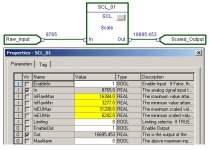
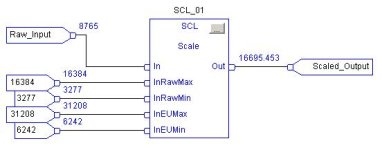
There is a scaling function in RSLOGIX5000. To use it you have to create an FBD or Structured Text subroutine and use the function there. The function is called SCL. Hope this helps. Andrew |
|
|
|
#3 |
|
Member
|
In logix 5K, you scale all of the signals in the I/O configuration. You really don't need to use SCP anymore, unless you are using indirect addressing for this function.
Believe me, it is REALLY easy. Just right click on the module in the software, click properties, then the configuration tab. |
|
|
|
#4 |
|
Member
|
Thanks a lot for your reply.
But unfortunately, my RSLogix5000 is a mini edition, which is not supporting FBD. And I have looked carefully in the IO module (My AI module is 1769-IF8) configuration tab, but did not find the place where I can input engineering H/L value and other parameters for scaling. I think it maybe different from module to module, since when I tried to add another type of analog iput module(1769-IF4), and find it support the scaling.
|
|
|
|
#5 |
|
Member
|
The scaling at the input module level only applies to 1756 I/O. The 1769 you will need to scale in a compute calculation (CPT) or use the FBD, which you stated you do not have access to.
Darren |
|
|
|
#6 |
|
Member
|
Since there is only a "thin profile" for this mpodule, you will need to use this technote to assist in configuring/enabling the channels of your module.
http://domino.automation.rockwell.co...9?OpenDocument |
|
|
|
#7 |
|
Member
|
Our distinguished colleague and PLC guru Ron Beaufort has posted an excellent thread on scaling.
http://www.plctalk.net/qanda/showthread.php?t=15069 While this thread is geared towards the SLC family of PLCs it contains all of the basic information needed to use the CPT instruction in a compact logix to perform the scaling. In addition, since you have many analog points to scale I suggest you create a UDT that contains the following elements: RAW DINT Raw analog value SCALED REAL Scaled analog value or Y term of scaling M REAL Slope of line for scaling B REAL Offese of line for scaling. Create only one user subroutine that can accept a tag of tne UDT type passed to it and perform the scaling and then pass the tag back out. You will use this subroutine over and over for each point rather than creating new code for each point. Create a tag for each analog point of the new UDT type. Copy the analog raw value from the IO module to the .RAW Dint. Then call the scaling subroutine and pass it it the new UDT tag. Repeat for each analog point. |
|
|
|
#8 |
|
Member
|
I do it just like Alaric suggested. I roll my own scale function in ladder. I use UDT's to handle all my data. I map the raw values into my UDT's and call the subroutine with a For next Loop. All you do is enter the raw minimum, raw maximum, scaled minimum, and scaled maximimum for each analog you want to scale.
Start by writing the formula you want to use for scaling in a compute instruction. Then create a UDT that has all the variables needed to fill in your formula. Then create a tag array of your UDT big enough to handle all your analogs plus room for growth. Then edit your compute formula to use indirect references where your array element equals the current index value of your For Next Loop. Once you figure this out the first time you will remember it. It really is simpler than it sounds. RSL |
|
|
|
#9 |
|
Member
|
Thanks for all your help.
I will try your method.
|
|
![]() |
| Bookmarks |
| Currently Active Users Viewing This Thread: 1 (0 members and 1 guests) | |
| Thread Tools | |
| Display Modes | |
|
|
Similar Topics
|
||||
| Thread | Thread Starter | Forum | Replies | Last Post |
| Custom Data Monitor in RSLogix 5000 | Oakley | LIVE PLC Questions And Answers | 3 | May 28th, 2007 02:53 AM |
| RSLogix 5000 V15 Features | Samneggs | LIVE PLC Questions And Answers | 18 | April 20th, 2006 05:45 PM |
| Newbie RSLogix 5000 | Paully's5.0 | LIVE PLC Questions And Answers | 6 | January 12th, 2006 05:02 PM |
| RSlogix 5000 professional | huynt | LIVE PLC Questions And Answers | 4 | August 2nd, 2005 01:45 AM |
| RSLogix 5000 | eastkodakguy | LIVE PLC Questions And Answers | 2 | July 3rd, 2002 11:28 AM |