![]() |
||
|
This board is for PLC Related Q&A ONLY. Please DON'T use it for advertising, etc. |
||
| ||
New Here? Please read this important info!!!
|
|
#1 |
|
Guest
Posts: n/a
|
Siemens TD 200 and S7-200 data block
I am using Step 7 MicroWin 32 V3.2.4.27 for a CPU-214
I have a TD 200 operator interface. The machine controlled by the PLC has the TD 200 as operator interface. I modified the original program so now I need to edit the TD 200 messages What can I do to be able to see what's in the data block? In other words translate the data block so that I can see the messages, modify, or add some (right now all I see is VB's) Thanks |
|
|
|
#2 |
|
Member
![]() Join Date: Feb 2004
Posts: 6
|
You can edit directly in to the DB and edit your message. Make Sure that you put "" around the phrase or message that you've edited.
|
|
|
|
#3 |
|
Guest
Posts: n/a
|
But the thing is there is no comments on the data block. This is what the data block looks like:
VB0 16#00 VB1 16#10 VB2 16#00 VB3 16#2D VB4 16#00 VB5 16#2D VB6 16#00 VB7 16#00 All the way down to VB 1023. What do I do next |
|
|
|
#4 |
|
Member
|
Hi
Well
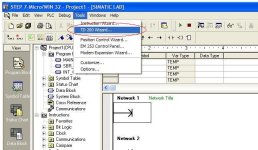
if you go to view / tool menu you find TD200 menu select it or copy your prog add new TD200 block say vb200 to vb300 then go to view/ tool menu you find their i did this thing way before but you try it message will get changed thanking you sandeep patil |
|
|
|
#5 |
|
Member
|
PM ,
what Sandeep means, is that microwin has a Wizard, when you open the wizard it will show you the messages and you can modify all the messages that are located in data block, see the picture below: |
|
|
|
#6 |
|
Guest
Posts: n/a
|
Farid
I know about the wizard and I tried to do that but it did not work. Actually I can not access the configuration for the program. When I open the wizard I only have the option to create a new block. The thing is I am working on a machine which was installed by the vendor. I am trying to make modifications of the program to better fit the need of my company. So I got the original program (vendor) by uploading it from the cpu which doesn't give me the option to change the TD 200 messages. That's why I am trying to see what I should do next. If there is a way to translate the Data Block or if I should go ahead and start a new configuration. |
|
|
|
#7 |
|
Guest
Posts: n/a
|
Is it possible that I can just add a new configuration to my program. Since I can not access the initial configuration of the TD 200 (because I am using a newer version of MicroWin than the one previously used) can I just add a new cblock with new addesses and add the new messages and at the same time use the old messages. I mean change the addresses in my PLC program to the new addresses configured and also use the ones that I don't need to change.
|
|
|
|
#8 |
|
Guest
Posts: n/a
|
NO THAT DID NOT WORK
ANY SUGGESTIONS |
|
|
|
#9 |
|
Guest
Posts: n/a
|
Yes, you can create a new TD200 parameter block. You will have to recreate all of the messages.
Uploading into a newer MicroWIN is OK, but you really need the original project files to be able to rerun the TD200 Wizard. |
|
|
|
#10 |
|
Guest
Posts: n/a
|
Yes CL that's what I did. I created a new data block by recreating all the messages. I am glad it took less time that I thought. Its better this way because now I can go back and make the changes that I want.
Thanx |
|
![]() |
| Bookmarks |
| Currently Active Users Viewing This Thread: 1 (0 members and 1 guests) | |
| Thread Tools | |
| Display Modes | |
|
|
Similar Topics
|
||||
| Thread | Thread Starter | Forum | Replies | Last Post |
| MPI comunication | Manuel Raposo | LIVE PLC Questions And Answers | 22 | July 16th, 2007 06:24 AM |
| Questions abt Siemens S7 200 | Preeya | LIVE PLC Questions And Answers | 3 | April 9th, 2007 07:39 AM |
| Any display with Siemens S7 200?? | Preeya | LIVE PLC Questions And Answers | 6 | January 14th, 2007 05:10 AM |
| Siemens S7 200 - Math question | Preeya | LIVE PLC Questions And Answers | 1 | December 16th, 2003 09:35 PM |
| s7 200 plc data blok | syed | LIVE PLC Questions And Answers | 1 | July 3rd, 2002 02:41 PM |