You are not registered yet. Please click here to register!


plc storereviewsdownloads
This board is for PLC Related Q&A ONLY. Please DON'T use it for advertising, etc.
 
Try our online PLC Simulator- FREE.  Click here now to try it.

---------->>>>>Get FREE PLC Programming Tips

New Here? Please read this important info!!!


Go Back   PLCS.net - Interactive Q & A > PLCS.net - Interactive Q & A > LIVE PLC Questions And Answers

PLC training tools sale

Reply
 
Thread Tools Display Modes
Old March 13th, 2011, 03:43 AM   #1
jeii
Member
Australia

jeii is offline
 
Join Date: Mar 2011
Location: Qld
Posts: 4
4 wire proximity sensor to plc input

Hi. I'm trying to teach myself PLC's on a mitsubishi FX2N-16MR.
I have connected a 4 wire PNP proximity sensor as NO to my plc but it is not switching the output.

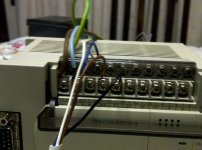
The indicator on the sensor shows that its working when it detects and i have connected the NO wire to my input and the NC wire to my 0V as per a wiring diagram i have.
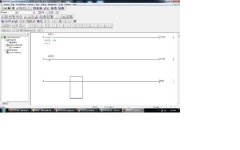
My program simply has 1 NC input and 1 NO input connected to a respective output.

I feel that maybe i have not specified something in GX developer?

I am using a CQ35-25NPP-KC1 sensor.

Thankyou for your help, please excuse my naivety.
Attached Images
File Type: jpg sensorInput.jpg (65.8 KB, 65 views)
File Type: jpg Ladder.jpg (27.6 KB, 50 views)
  Reply With Quote
Old March 13th, 2011, 05:42 AM   #2
Tharon
Member
United States

Tharon is offline
 
Join Date: Jan 2007
Location: Michigan
Posts: 1,059
I would not attach the white wire to 0V. While sometimes the white wire is not used, it can be used as a NC output, or sometimes 0-10V or 4-20ma output, etc. Keep the wire taped off and not terminated on any terminal. What happens if you manually switch voltage to the input (using a jumper wire from 24V)?
  Reply With Quote
Old March 13th, 2011, 05:46 AM   #3
ibora
Member
Turkey

ibora is offline
 
Join Date: Dec 2008
Location: Izmir
Posts: 43
Quote:
Originally Posted by jeii View Post
..NC wire to my 0V as per a wiring diagram i have..
You should disconnect NC wire from 0V. You should keep it free or connect to another input.
  Reply With Quote
Old March 13th, 2011, 06:03 AM   #4
jeii
Member
Australia

jeii is offline
 
Join Date: Mar 2011
Location: Qld
Posts: 4
Thanks for the response guys.
I have tried with the NC wire removed, and manualy switching on the input did not work either.
Also, i can see when in monitor mode that the X1 input is not being activated.
  Reply With Quote
Old March 13th, 2011, 06:10 AM   #5
Tharon
Member
United States

Tharon is offline
 
Join Date: Jan 2007
Location: Michigan
Posts: 1,059
Does the indicator for the PLC input turn on?
  Reply With Quote
Old March 13th, 2011, 06:13 AM   #6
jeii
Member
Australia

jeii is offline
 
Join Date: Mar 2011
Location: Qld
Posts: 4
It doesnt.
Is there anything else i need to do to associate the sensor with the ladder program in Gx Developer?
  Reply With Quote
Old March 13th, 2011, 06:51 AM   #7
Tharon
Member
United States

Tharon is offline
 
Join Date: Jan 2007
Location: Michigan
Posts: 1,059
You shouldn't. And I believe the PLC Input indicator should turn on regardless of whether or not it's addressed in the PLC program.

Do you have access to a voltmeter? Can you make sure that 24V is being supplied to the Input terminal?

Your picture shows the RUN indicator on the PLC is off. Is that just because the PLC is powered down when you took the picture?
  Reply With Quote
Old March 13th, 2011, 06:59 AM   #8
BTalbot
Member
United States

BTalbot is offline
 
BTalbot's Avatar
 
Join Date: Jul 2002
Location: New Jersey
Posts: 237
For PNP sensors you need to make sure the S/S terminal is connected to the 0V terminal
  Reply With Quote
Old March 13th, 2011, 08:46 AM   #9
Tharon
Member
United States

Tharon is offline
 
Join Date: Jan 2007
Location: Michigan
Posts: 1,059
Quote:
Originally Posted by BTalbot View Post
For PNP sensors you need to make sure the S/S terminal is connected to the 0V terminal
Oh. I was wondering where you connected the 24V common for the inputs.
  Reply With Quote
Old March 14th, 2011, 02:22 AM   #10
jeii
Member
Australia

jeii is offline
 
Join Date: Mar 2011
Location: Qld
Posts: 4
Thanks for your help guys, i should of realised this. Hopefully i will have a more complex problem next time..
  Reply With Quote
Reply
Jump to Live PLC Question and Answer Forum

Bookmarks


Currently Active Users Viewing This Thread: 1 (0 members and 1 guests)
 
Thread Tools
Display Modes

Posting Rules
You may not post new threads
You may not post replies
You may not post attachments
You may not edit your posts

BB code is On
Smilies are On
[IMG] code is On
HTML code is Off
Forum Jump

Similar Topics
Thread Thread Starter Forum Replies Last Post
LG PLC, do I use PNP or NPN proximity switch for input Peter LG LIVE PLC Questions And Answers 4 September 20th, 2009 08:59 AM
AD DL06 programming help ThermoT LIVE PLC Questions And Answers 46 June 7th, 2006 08:21 AM
PLC input voltages ronbol LIVE PLC Questions And Answers 2 February 13th, 2006 04:15 PM
Pull-up resistor & PLC input????? Charles1 LIVE PLC Questions And Answers 6 January 27th, 2006 01:48 AM
Thumbwheel Switch Input /S7-200 PLC Tomy LIVE PLC Questions And Answers 2 April 8th, 2004 06:17 PM


All times are GMT -5. The time now is 03:53 AM.


.